- Update in Dto
- Update in Main Table
- Add Scalar Property in Edmx Table
- Open Edmx in xml format and add the property
- Then go to table mappings and map the added field
Thursday, February 6, 2025
Monday, September 9, 2024


Monday, August 19, 2024
| Feature | Class | Record | Struct |
|---|---|---|---|
| Type | Reference Type | Reference Type (since C# 10, can be record struct) | Value Type |
| Memory Allocation | Typically allocated on the heap. | Typically allocated on the heap. | Typically allocated on the stack (or heap if used as part of a class or array) |
| Default Constructor | Can have a parameterless constructor, and can be explicitly defined. | Implicit parameterless constructor is not allowed; parameters are required. | Parameterless constructor is provided by default and initializes all fields to default values. |
| Inheritance | Supports inheritance (can inherit from other classes and be inherited). | Supports inheritance (can inherit from other records but not from classes). | Does not support inheritance (cannot inherit from or be inherited by other types). |
| Equality | Uses reference equality by default, can override Equals and GetHashCode for value-based equality. | Uses value-based equality by default (based on all properties). Automatically implements Equals, GetHashCode, and ToString. | Uses value-based equality by default (based on all fields). Automatically implements Equals, GetHashCode, and ToString. |
| Mutability | Mutable by default; properties can be changed after object creation. | Immutable by default; properties are readonly and set via constructor. | Immutable by default (properties are typically readonly and initialized in the constructor). |
| Deconstruction | Not supported by default. | Supports deconstruction with tuple-like syntax. | Supports deconstruction with tuple-like syntax. |
| Constructor | Can have multiple constructors with various parameters. | Primary constructor is defined with positional parameters; can also have additional constructors. | Constructor must initialize all fields; no parameterless constructor allowed unless provided by the compiler. |
| Default Values | Fields initialized to default values if not explicitly set. | Properties are initialized via the constructor. | Fields are initialized to default values (e.g., 0, null). |
| Use Cases | Used for complex objects with behavior and mutable state. | Ideal for immutable data models, DTOs, and scenarios where value-based equality is important. | Ideal for lightweight, immutable data structures where copying and stack allocation are beneficial. |
Friday, May 17, 2024
Intro
• package.json
• (list
of dependencies)
• package-lock.json
• (details
list of that dependencies)
• angular.json
• (map
everything here: assets, scripts etc)
• tsconfig.json
• (typescript
configuration file)
• polyfills.ts
• (compatibility
file)
Components
• Modules
must be declared in the imports
• Components
must be declared in the declarations
• Standalone
components are not dependent in any modules and it must be declared in imports
• and Pipes are doing the transformation over text
Bindings - Two Way, Property, Event
Routing
• Basic
Routing
• Routes – for mapping path
& component
• routerLink – navigate to
different routes
• router-outlet– for displaying
matched route
• Child
routing
• Activated
Route (const routeId = route.snapshot.paramMap.get(‘id’);)
• Module
Routing
• const
routes : Routes
• Lazy
Loading
• Load when required (loadChildren then import)
Directives
• Add
additional behavior to elements
• Components
works as a directive
• Attribute
Directive
ngClass (Binding
Classes)
ngStyle (Binding
Styles, Only accept objects s = {})
ngModel (Two Way
Binding)
• Structural
Directive
*ngIf
*ngFor
*ngSwitch
Services
• Defined
with @Injectable
• All
are in observable format and without subscribe it won’t
work (Rxjs feature)
FormType
• TDF
–
handle in html file
• ngForm
• Reactive
–
handle in ts file
• FormGroup
Guard
• used
to control access in particular route
• canActivate
• canActivateChild
• canDeactivate
• canLoad
Interceptor
• Used
for token login
• Declares in app.module [Providers]
Rxjs
• Observable and Operators
• Promise (then, then, finally)
Monday, March 4, 2024
🔎Definition---
Pending: Initial state, neither fulfilled nor rejected.
Fulfilled: The operation completed successfully.
Rejected: The operation failed.
On the other hand, RxJS (Reactive Extensions for JavaScript) is a library for reactive programming using observables. An observable represents a stream of data that can be observed over time. It provides powerful tools for handling asynchronous and event-based programming.
🔩Conversion---
Converting a Promise to an Observable is a common operation in RxJS when integrating with libraries or APIs that return Promises. RxJS provides the
from function to convert various data sources, including Promises, into Observables. Converting an Observable to a Promise is useful when you need to work with Promise-based APIs or when you want to consume Observables in a Promise-based context. RxJS provides the
toPromise() operator to convert an Observable into a Promise.🔚Conclusion---
Promises are simpler and more straightforward for handling single asynchronous operations that produce a single value or error.
Observables are more powerful and suitable for handling multiple asynchronous values over time, supporting cancellation, and offering a wide range of operators for transforming and combining streams of data. When you promise you can't cancel and for cancelling you have to use another library. But you can Unsubscribe to cancel in observables. Also you have to unsubscribe every time that means writing same code couple of times when working on a big project but in Promises it will go on rejected state.
Saturday, June 10, 2023
If you have problems running create-react-app in text editors but the package is installed globally. So here is the SOLUTION-------------
Open PowerShell as an administrator. You can do this by right-clicking on the Windows Start button and selecting "Windows PowerShell (Admin)".
In the PowerShell window, run the following command to check the current execution policy:
powershellGet-ExecutionPolicyThe output will be one of the following:
- Restricted: This means that script execution is disabled. You need to change it to a more permissive policy.
- AllSigned or RemoteSigned: These policies allow script execution but require digitally signed scripts. If you encounter this, you can skip changing the execution policy and try using the
npx create-react-appcommand instead ofcreate-react-app.
To change the execution policy to allow script execution, run the following command:
powershellSet-ExecutionPolicy UnrestrictedYou will be prompted to confirm the change. Type
Yand press Enter.After changing the execution policy, you should be able to use the
create-react-appcommand without encountering the "running scripts is disabled" error.Once you've finished using
create-react-app, it's recommended to set the execution policy back to a more secure value. Run the following command:powershellSet-ExecutionPolicy Restricted
By following these steps, you should be able to resolve the script execution error and use create-react-app globally in any text editor.
Sunday, May 7, 2023
SHR stands for "Shift Right" and it is used to shift the bits in a register or memory location to the right. When a number is shifted to the right using SHR, the least significant bit (LSB) is replaced by a zero, and the most significant bit (MSB) is shifted out and lost. The other bits are shifted to the right by the specified number of positions. For example, the instruction "SHR AL, 1" will shift the bits in the AL register to the right by 1 position. SAR stands for "Shift Arithmetic Right" and it is used to shift the bits in a register or memory location to the right while preserving the sign bit. When a number is shifted to the right using SAR, the least significant bit (LSB) is replaced by a zero, and the most significant bit (MSB) is shifted out and lost. However, unlike SHR, SAR preserves the sign bit by shifting it into the vacated MSB position. This ensures that the sign of the number is preserved after the shift. For example, the instruction "SAR BL, 1" will shift the bits in the BL register to the right by 1 position while preserving the sign bit.
SHL stands for "Shift Left" and it is used to shift the bits in a register or memory location to the left. When a number is shifted to the left using SHL, the most significant bit (MSB) is replaced by a zero, and the least significant bit (LSB) is shifted out and lost. The other bits are shifted to the left by the specified number of positions. For example, the instruction "SHL AX, 1" will shift the bits in the AX register to the left by 1 position. SAL stands for "Shift Arithmetic Left" and it is also used to shift the bits in a register or memory location to the left. The operation performed by SAL is identical to SHL, and both instructions can be used interchangeably. The only difference is that the Intel documentation recommends using SAL when performing arithmetic shifts, to emphasize that the sign bit is shifted along with the other bits. IN summary, the main difference between SHL and SAL is that SHL performs a logical shift, while SAL performs an arithmetic shift. However, in practice, the two instructions are identical and can be used interchangeably for left shifts.

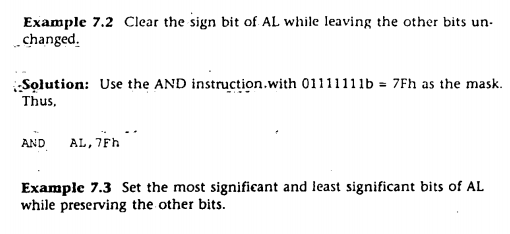
ROL: The ROL instruction performs a left rotation of the bits in a register or memory location. Each bit is shifted one position to the left, with the carry flag being shifted into the least significant bit (LSB) and the most significant bit (MSB) being shifted into the carry flag. This effectively shifts all bits one position to the left, including the carry flag. For example, the instruction "ROL AL, 1" will rotate the bits in the AL register one position to the left.• ROR: The ROR instruction performs a right rotation of the bits in a register or memory location. Each bit is shifted one position to the right, with the carry flag being shifted into the most significant bit (MSB) and the least significant bit (LSB) being shifted into the carry flag. This effectively shifts all bits one position to the right, including the carry flag. For example, the instruction "ROR BH, 1" will rotate the bits in the BH register one position to the right. Both ROL and ROR are circular shifts, which means that the shifted bits are rotated around to the opposite end of the register or memory location. The carry flag plays a key role in this operation, as it is shifted into the least significant bit (LSB) during a left rotation and into the most significant bit (MSB) during a right rotation.




Thursday, March 2, 2023
Tuesday, January 3, 2023


Saturday, September 24, 2022
A microcontroller is a small computer on a single integrated circuit chip. A microcontroller typically contains one or more processor cores, along with additional peripherals (memory, serial interface, timer, programmable I/O peripherals, etc.) on the same chip.
A microprocessor is a computer processor that incorporates the functions of a central processing unit (CPU) onto just a few (and often only one) integrated circuits.
Microprocessor and Microcontroller Architecture Explained
Microprocessor and Microcontroller Applications Explained
Three Key Differences Between Microcontrollers and Microprocessors
Cost
Speed
Power Consumption
Embedded Systems and Microcontrollers
- They are self-contained, including all of the necessary peripherals on a single integrated circuit chip
- They are designed to run a single dedicated application
- They can be optimized (software and hardware) for a single dedicated application
- They exhibit low power consumption and may include power-saving features, making them ideal for applications that require the processor to function for long periods of time without human interference
- They are relatively inexpensive when compared to CPUs, mainly because the entire system exists on a single chip
How Do Embedded Systems Work?
Embedded Systems Hardware
- Processor - Embedded systems are built around a microprocessor or microcontroller. Microcontrollers include one or more processors (CPUs), along with integrated memory and programmable input/output peripherals. Most automatically controlled products or devices use microcontrollers , including office machines, power tools, and automobile engine control systems.
- Power Supply - Embedded systems have significantly lower power requirements than a standard computer due to their small size and comparatively low processing power. Embedded engineers should choose a power supply that offers a stable and smooth output of power to the microcontroller with adequate output current to drive the load and stable performance in a variety of environments.
- Memory - If an embedded system is powered by a microcontroller, the system's memory is already available on the chip. If using a microprocessor, a memory chip should be added to the system. Embedded systems use read-only memory (ROM) to store the software program used to operate the microcontroller and random access memory (RAM) to temporarily store data that is received or in-use by the system.
- Communication Ports - Embedded systems use wired communications to transmit data between the microcontroller, peripheral devices, and other embedded systems. Engineers must select a communication protocol to facilitate this data exchange, ensuring that devices in the system are all "speaking the same language" when they communicate or transmit data. Common communication protocols for embedded systems include the I2C protocol, SPI protocol, and the USB protocol, but there are many other wired and wireless protocols available for engineers to choose from.
Embedded Systems Software and RTOS
Embedded Systems Applications Today
Embedded Systems in Communications
Embedded Systems in Consumer Electronics
Embedded Systems in Automotive Applications
Embedded Systems in Healthcare
The Future of Embedded Systems
Summary
Ultimately, microcontrollers and microprocessors are different ways of organizing and optimizing a computing system based on a CPU. While a microcontroller puts the CPU and all peripherals onto the same chip, a microprocessor houses a more powerful CPU on a single chip that connects to external peripherals. Microcontrollers are optimized to perform a dedicated low-power application - ideal for embedded systems - while microprocessors are more useful for general computing applications that require more complex and versatile computing operations.
Differences Between Arduino and Raspberry Pi
| No. | Arduino | Raspberry Pi |
|---|---|---|
| 1. | Control unit of Arduino is from Atmega family. | While control unit of Raspberry Pi is from ARM family. |
| 2. | Arduino is based on a microcontroller. | While Raspberry Pi is based on a microprocessor. |
| 3. | It is designed to control the electrical components connected to the circuit board in a system. | While Raspberry Pi computes data and produces valuable outputs, and controls components in a system based on the outcome of its computation. |
| 4. | Arduino boards have a simple hardware and software structure. | While Raspberry Pi boards have a complex architecture of hardware and software. |
| 5. | CPU architecture: 8 bit. | CPU architecture: 64 bit. |
| 6. | It uses very less RAM, 2 kB. | While Raspberry Pi requires more RAM, 1 GB. |
| 7. | It clocks a processing speed of 16 MHz. | While Raspberry Pi clocks a processing speed of 1.4 GHz. |
| 8. | It is cheaper in cost. | While Raspberry Pi is expensive. |
| 9. | It has a higher I/O current drive strength. | While Raspberry Pi has a lower I/O current drive strength. |
| 10. | It consumes about 200 MW of power. | While it consumes about 700 MW of power. |
| 11. | Its logic level is 5V. | Its logic level is 3V. |
| 12. | It does not have internet support. | It has inbuilt Ethernet port and WiFi support. |
| 13. | It has higher current drive strength. | It has lower current drive strength. |
| 14. | Some of the applications of Arduino are traffic light countdown timer , Weighing machines , etc. | Some of the application of Raspberry Pi are Stop motion cameras , Robot Controllers , Game Servers. |
References
Total Phase Blog. 2022. Microcontroller vs Microprocessor - What are the Differences?. [online] Available at: <https://www.totalphase.com/blog/2019/12/microcontroller-vs-microprocessor-what-are-the-differences/#:~:text=Ultimately%2C%20microcontrollers%20and%20microprocessors%20are,that%20connects%20to%20external%20peripherals.> [Accessed 24 September 2022].
GeeksforGeeks. 2022. Difference between Arduino and Raspberry Pi - GeeksforGeeks. [online] Available at: <https://www.geeksforgeeks.org/difference-between-arduino-and-raspberry-pi/#:~:text=Arduino%20is%20based%20on%20a,circuit%20board%20in%20a%20system.> [Accessed 24 September 2022].